


Gartner surveyed customers in 2024 and found that only 14% of service issues get fully resolved in self-service. Salesforce quotes that number itself, in the June 2025 announcement of what it calls agentic self-service. The vendor opens with the problem, then sells the fix.
That framing is worth sitting with. A Salesforce Customer Portal has been around for years, usually an Experience Cloud site with a knowledge base, a case list and a login. Adding Agentforce changes what the front of that site does. It does not change what sits behind it, and that part decides whether any of this works.
What does agentic self-service actually mean for a Salesforce Customer Portal?
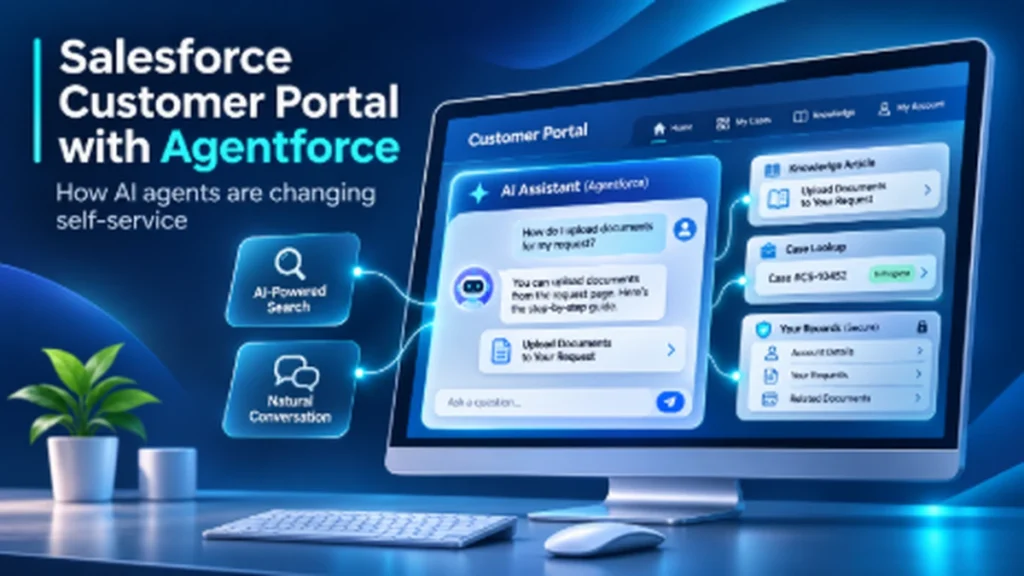
Salesforce’s announcement, written by Kishan Chetan, who runs Service Cloud, describes Agentforce agents as the core of the portal and not an add-on. Two features get the headline. Dynamic Search passes the customer’s search context to Agentforce, so a query becomes the start of a conversation. Dynamic Conversations uses the conversation to pull up a relevant knowledge article in real time. The example in the post is a file-upload article that appears full screen with the upload link already on it.
The Service Cloud product page describes the same idea as a single prompt bar for search and chat. Conversational Search is labeled as powered by Agentforce. The page also lists an Agent Optimizer that refines responses as it learns from interactions, and a Help Agent Quick Setup with a guided no-code launch.
The pitch is that customers type a sentence and get back an answer, an article or an action, where the old search box returns a ranked list of links.
Data Cloud feeds personalization. Per the announcement, the agent can draw on past conversations, purchases and buying signals. Whether a given org has that data in usable shape is another question entirely, and one the announcement leaves alone.
Where do the numbers come from?
Salesforce attaches several figures to the launch. Self-service resolutions rise by more than 80%, credited to a customer story on Agentforce for support. Up to five times faster ROI and 20% lower total cost of ownership come from a March 2025 press release. Salesforce also says its own case volume fell 8%.
Every one of these is vendor-reported. Nothing in the announcement points to an independent measurement, and the 80% figure comes from a single customer story, not a benchmark across orgs. A separate line in the post says 61% of service professionals believe their organizations handle issues proactively, while only 33% of customers agree. That gap between the two groups is probably the most useful number in the whole piece, since it describes the distance between how a service team sees itself and how customers experience it.
Different outlets also summarize the 80% claim in opposite directions. Salesforce’s own post says resolutions increase by over 80%. At least one trade write-up says reduce. Anyone quoting it in a business case should go back to the source wording.
How does an agent get onto an Experience Cloud site?
Plumbing, mostly. Salesforce’s own workshop and Trailhead material describe a chain of pieces. An Enhanced Chat messaging channel carries the conversation. That channel needs the site’s domain, with the https:// and the path stripped, so something like mydomain.my.site.com. An Embedded Service deployment connects the channel to the site, and a Route Messaging Session to Agent flow in Omni-Channel sends the chat to the Agentforce agent. In Experience Builder, the Embedded Messaging component gets dragged onto a page, and the site is published.
One step that trips people up: the site has to be on the CORS allowlist. Trailhead warns that without it the chat window never loads and there’s no obvious error explaining why. A quiet failure like that costs an afternoon.
Versions matter here. The material mixes Enhanced Chat v1, v2 and Embedded Messaging, and the menu names differ between them. Salesforce Help pages also render only through JavaScript, so a few of the details above come from Trailhead and workshop content and not from the Help articles themselves. Anyone building this follows the release in their own org.
Does the agent see what the customer sees?
Not automatically, and this is where a Salesforce Customer Portal with Agentforce gets interesting.
Salesforce’s Help documentation says Service Agents connect to enhanced messaging channels, and those channels support both authenticated and unauthenticated external users. Without credential-based user verification, the agent runs as the agent user, a single identity with its own permissions. With verification, the agent runs as the logged-in site user instead. And that second option, according to the documentation, is available only for Enhanced Chat v1 or v2 deployed to Experience Cloud sites.
The consequence is easy to miss. An agent running as the agent user can reach whatever the agent user can reach, for every customer who opens the chat. An agent running as the logged-in user inherits that customer’s sharing rules and field-level security. The second setup is the one that matches how a customer portal is supposed to behave, with each account seeing its own records and nothing else.
Salesforce’s Trailhead material also notes that the Service Agent handles only conversations the customer starts. Proactive outreach, such as the renewal reminders and issue alerts the announcement previews, is described as future direction.
Why does guest user security matter more once an agent is involved?
An agent is one more door into the data. The older doors still need to be shut.
In March 2026 Salesforce published guidance on securing Experience Cloud guest access, updated March 11, after a threat-actor campaign that took advantage of overly permissive guest settings. The company says the activity traced to customer-configured guest user settings and not a platform flaw. The settings it names are specific. The Guest User Profile under Builder, Settings, General should hold only the object and field access the site clearly needs. Default External Access in Sharing Settings sits at Private for all objects, with “Secure guest user record access” on. The “Allow guest users to access public APIs” box is unchecked, and so is API Enabled on the guest profile. Portal User Visibility and Site User Visibility are unchecked too. Self-registration gets removed from the login page assignment when the site doesn’t need it.
Further items cover Enhanced Personal Information Masking for sensitive User fields, Profile Filtering, and a manual review of field-level security on Contact, Lead, Case and custom objects. For monitoring, the guidance points to Aura Event Monitoring logs, looking for queries against non-public objects, spikes from unfamiliar IP addresses and off-hours access.
A chat agent added to a site with a loose guest profile inherits that looseness. The agent isn’t the weak point. The configuration under it is, and the agent just makes it easier to ask questions at volume.
What does Agentforce cost on a customer-facing portal?
Salesforce’s Agentforce pricing page lists a few models. Flex Credits cost $500 per 100,000, and a standard action uses 20 credits, which works out to $0.10 per action in US dollars. A per-conversation price of $2 covers customer-facing agents. The page says Flex Credits and Conversations cannot be used in the same org, and that unused Flex Credits do not roll over to the next term. Overage carries no penalty, but usage beyond the entitlement is billed at the contracted rate. Help Agent resolutions are listed at $2 each.
The Service Cloud portal page adds its own packaging. Service Portal Login and Service Portal Member plans appear, with the login plan described as including unmetered Agentforce and Data 360 queries during a 24-hour login session.
Prices on the page are labeled for information only and subject to change. The math is simple enough to run, though. A site that gets thousands of chats a month and prices them at $2 each lands in a very different budget than one that counts actions. Which model fits depends on how many steps the average conversation takes.
Why is the knowledge base the unglamorous deciding factor?
Agents answer from what they’re given. The Service Cloud page mentions knowledge articles for common questions and an Enterprise Knowledge feature on Data 360 that connects third-party knowledge sources to ground generated responses. Grounding is the key word there. An agent pointed at stale articles produces fluent, confident, wrong answers.
Anyone who has run a portal knows the state many knowledge bases are in. Duplicate articles, three versions of the same return policy, screenshots from two releases ago. A search box hides that mess because it only shows ten results. A conversational agent exposes the mess, since it may blend them.
So the quiet work happens in the content team’s backlog, not the AI team’s roadmap. Which articles are published to the portal, who owns each one, when it was last reviewed. That is where resolution rates get won or lost, whatever the demo suggests.
What about portals that are not built on Experience Cloud?
Some teams run a Salesforce Customer Portal on something other than Experience Cloud, for reasons that range from licensing models to front-end control. CRMJetty’s Salesforce Customer Portal is one example, and its page describes Salesforce Connected Data Widgets that show real-time Salesforce data to users. Its page lists role-based access control, a no-code CMS builder, OTP-based two-factor sign-in with reCAPTCHA on the login and password-reset flows, SSO, and IP restriction. Pricing there is by user block and not per login.
The page also references an Agentforce integration and says role-based access decides who can use AI features, though it spells out little about what the integration does in practice. The same applies to any portal that says AI is included. What the agent can do, as which user, and against which objects, is the spec that matters.
Experience Cloud with a native Agentforce agent and a packaged portal sit at different points on the same trade-off, and neither one removes the need for the sharing model underneath.
What changes for the people running the portal?
Support teams get a different queue. Simple questions get handled in chat, and what lands on a human agent is what the chat couldn’t finish. Those cases tend to be harder and more emotional, which changes staffing and training more than most project plans admit.
Reporting changes too. Case deflection used to be estimated from article views. With an agent, a conversation has an outcome that can be counted: resolved, escalated or abandoned. Salesforce’s pricing even builds a price around the resolution. That makes the metric more honest, and it also makes it uncomfortable when the first month’s numbers come in lower than the launch deck.
Honestly, the first six months look more like a tuning exercise than a transformation. Topics the agent handles badly get found by reading transcripts. Actions get added one at a time. Knowledge articles get rewritten because the agent exposed their flaws. Nothing glamorous. Still the work that produces a portal people actually use.
What does a sensible starting scope look like?
A narrow one. Order status, password help, a returns policy question, a case lookup for a signed-in customer. These have clear answers and low risk. Anything that changes money or contract terms waits until the identity setup and permission model have been tested with real accounts.
The 14% Gartner figure from the start of this piece is the baseline Salesforce is pitching against, and it’s a low bar. Clearing it takes a well-kept knowledge base, a locked-down guest profile and an agent running as the right user. The model itself is the easy part.